HomeWorks
ExperimentsWriting

© 2025 Guo Ying. Made with midnight builds.

Works>

Aura Commerce — E-commerce Marketplace

2025
Aura Commerce — E-commerce Marketplace
E-commerceMarketplaceEvent-drivenFull-stack

A Shopee-style marketplace serving the Vietnamese shopper, originally branded Nantian 南天: a storefront with flash sales and vouchers, a seller portal for shops, and an admin console covering 856 products, orders, permissions and banners. Express + MongoDB behind Next.js, with Redis, RabbitMQ workers and Socket.IO carrying the realtime parts.

Visit Website Source on GitHub
Status
In production
Role
Full-stack developer
Platform
Web (responsive)
Stack
Next.js 16 · React 19 · TypeScript · Redux Toolkit · TanStack Query · Tailwind CSS · Express 5 · MongoDB · Redis · RabbitMQ · Socket.IO · VNPay · Mistral AI

The product

Aura Commerce — the marketplace that started life as Nantian 南天 — is a multi-vendor shop: buyers browse a catalogue of 856 products, sellers run their own storefront, and operators manage the whole system from one admin console. Three surfaces, one codebase, one catalogue.

Flash sales are a data problem

The countdown on the homepage is not decoration — it has to agree with the price. The discount window lives on the product (price + discountPrice + campaign end), and the rail renders straight from the API payload, so a timer can never outlive its discount.

// The campaign carries its own window; the UI renders what the API returns.
const { endsAt, items } = await getFlashSale('active');
// countdown → endsAt, prices → items[].price.discountPrice

Three audiences, one catalogue

Storefront, seller portal and admin console all read the same MongoDB catalogue through the same Express API. A product edited by a seller shows up in the storefront grid, the category page and the admin table without a sync job.

Realtime without a second service

Chat and notifications run on Socket.IO with the Redis adapter, so any worker in the cluster can push an event to a customer connected to a different process.

Workers, not requests

Order emails, notifications and AI jobs are RabbitMQ consumers with per-queue prefetch and dead-letter queues. The HTTP request returns as soon as the order is written; the slow parts retry behind it.

AI on top of the catalogue

Mistral (through LangChain) does two jobs: a shopping assistant that answers product questions, and product embeddings stored in product_embeddings so search can match meaning instead of keywords.

What the screens show

Every screen below was captured from the running app — Express 5 on MongoDB Atlas, Redis, RabbitMQ, and the Next.js client.
Captured from the running app

Screens & specifications

Every screen below was captured from the live stack — route, behaviour, and the implementation behind it. 11 screens

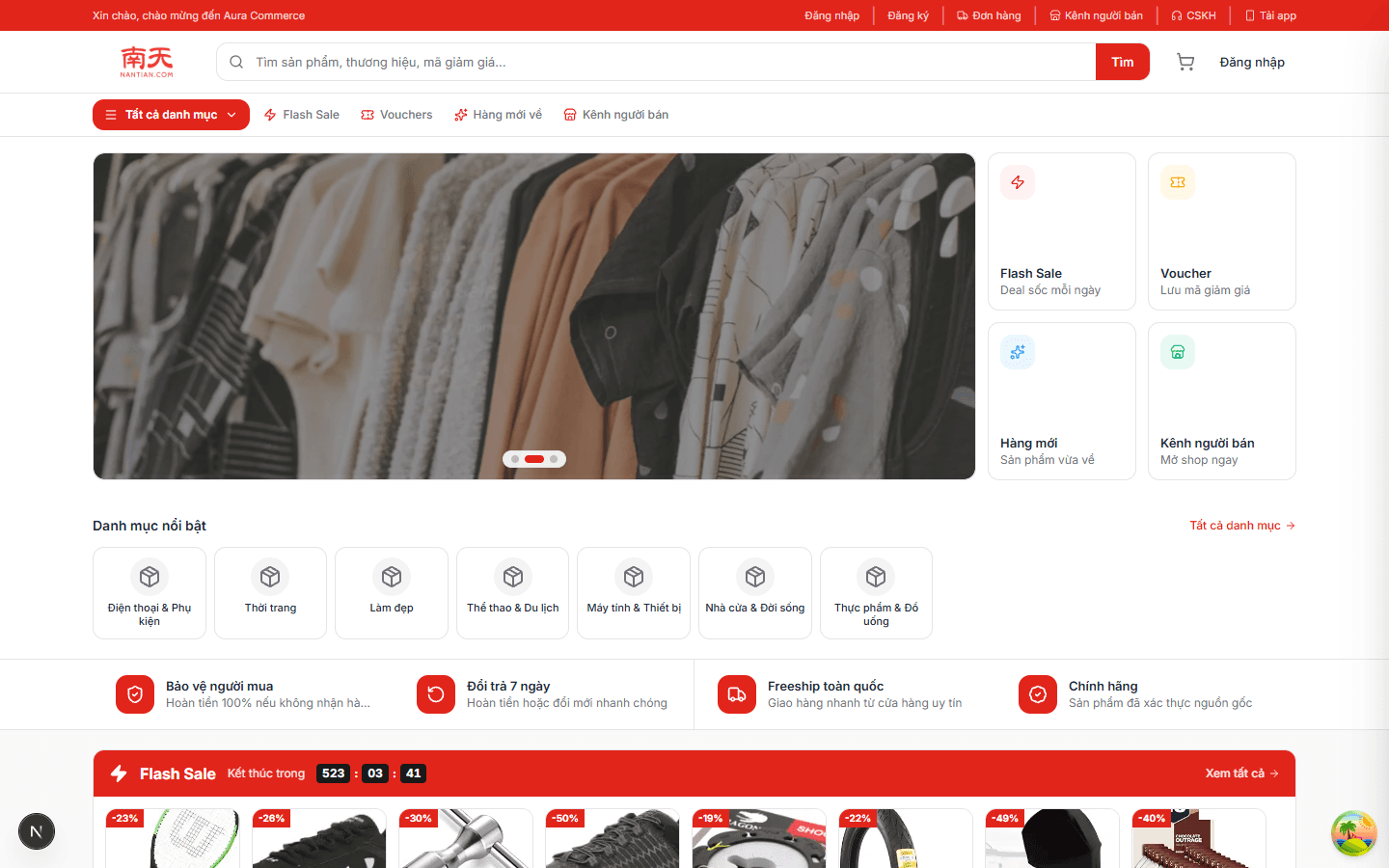
Storefront home
Route/

Storefront home

Hero carousel, a category rail, service guarantees and the flash-sale rail with its live countdown and discount badges.

  • Every rail is fed by one catalogue API; nothing on this page is hard-coded merchandising.
  • Client-side data fetching through TanStack Query, so returning to the page does not refetch what it already has.
  • Red/ink palette with JD-style merchandising density — the visual language the whole store shares.
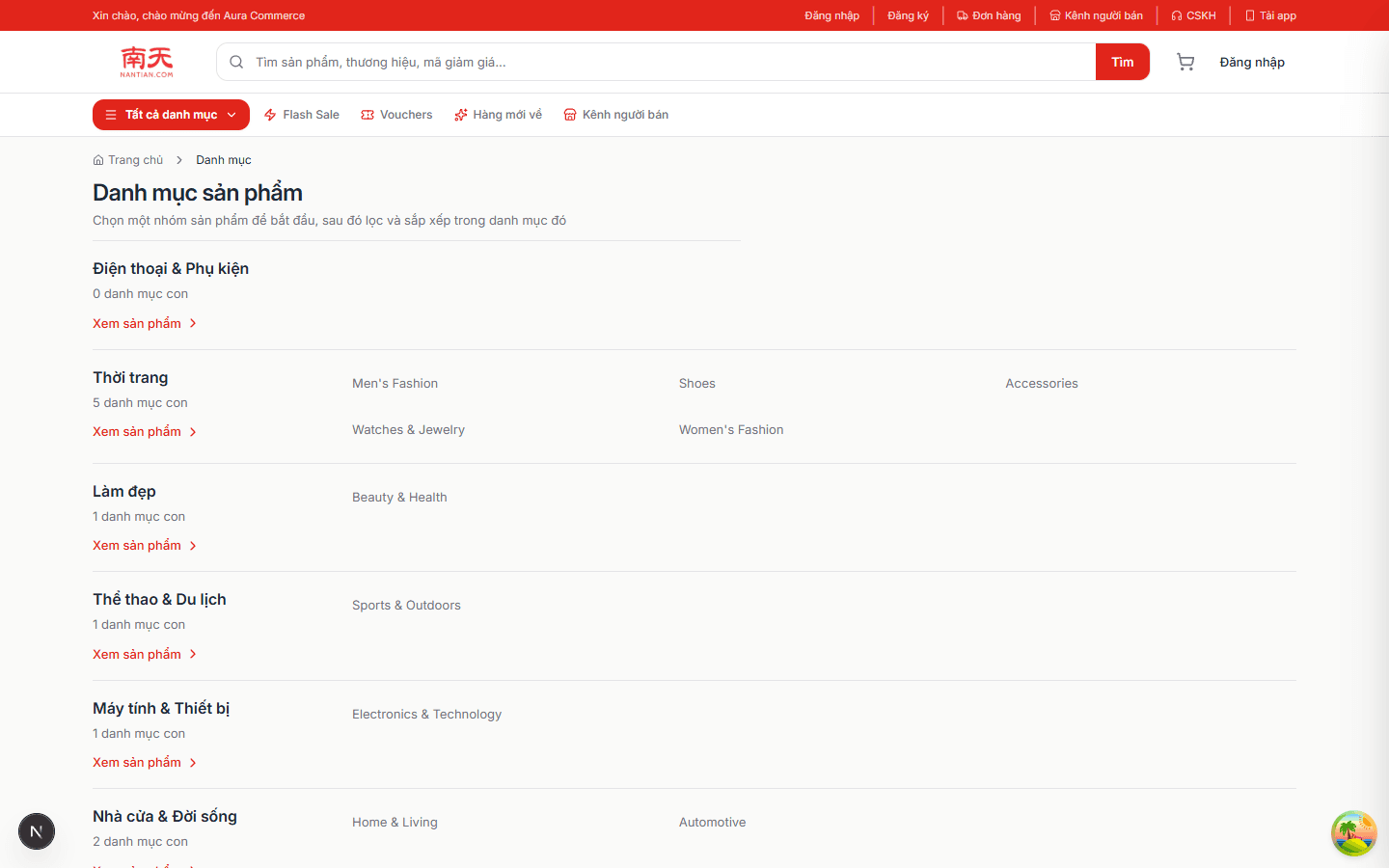
Category index
Route/categories

Category index

Top-level categories with their subcategory counts and a direct jump into each listing.

  • The tree comes from the categories collection and is shared by storefront, seller and admin.
  • Counts are aggregated server-side so the page needs a single round trip.
Category listing & filters
Route/categories/:slug

Category listing & filters

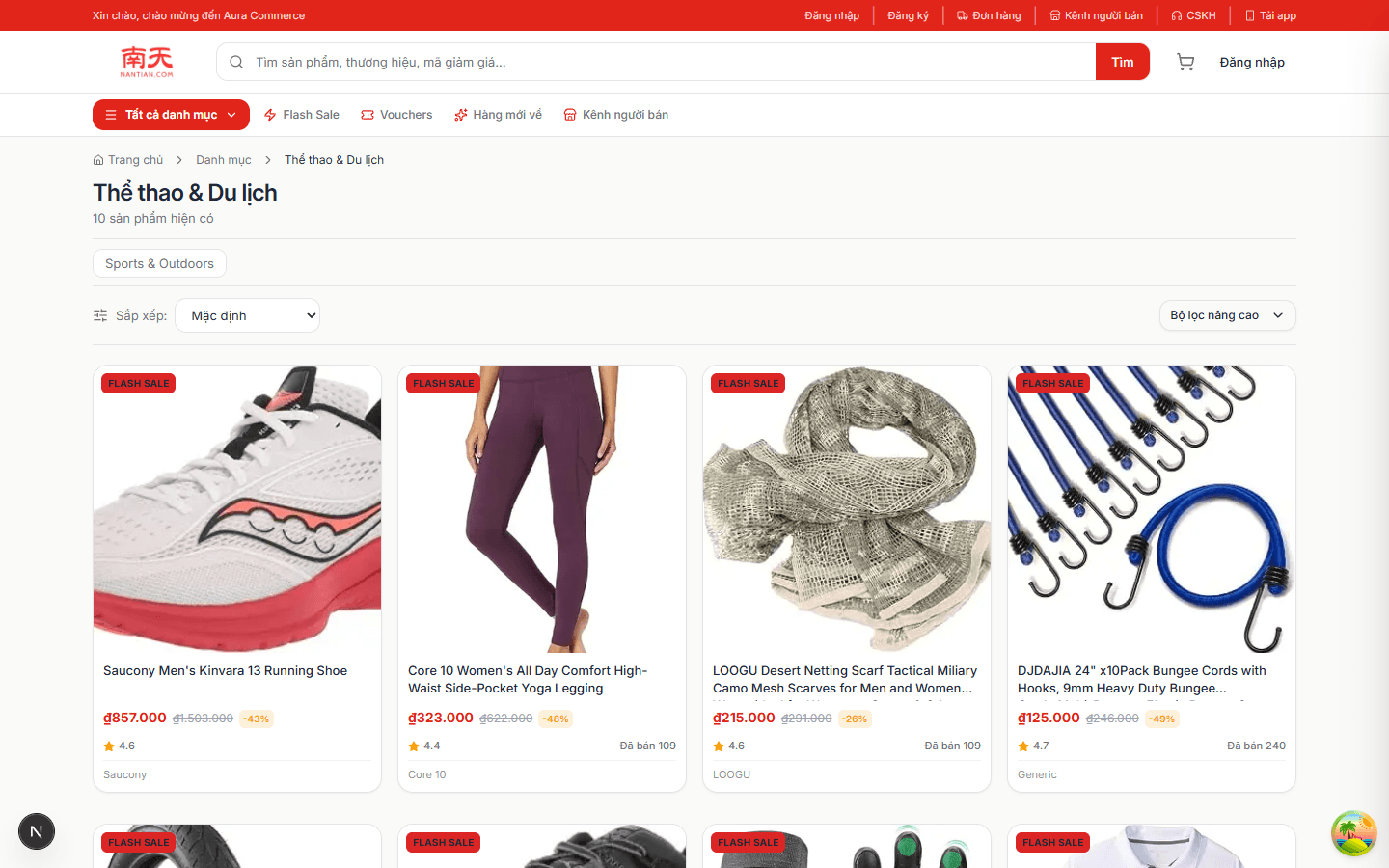
The dense grid the marketplace is judged on: result count, category chips, price range, rating and brand filters, with four sort modes.

  • Filters are query parameters, so any filtered view is a shareable URL.
  • Pagination and sorting are handled by the product service with indexed Mongo queries.
  • Skeleton cards while data is in flight; the grid keeps its layout so nothing jumps.
Product detail
Route/products/:slug

Product detail

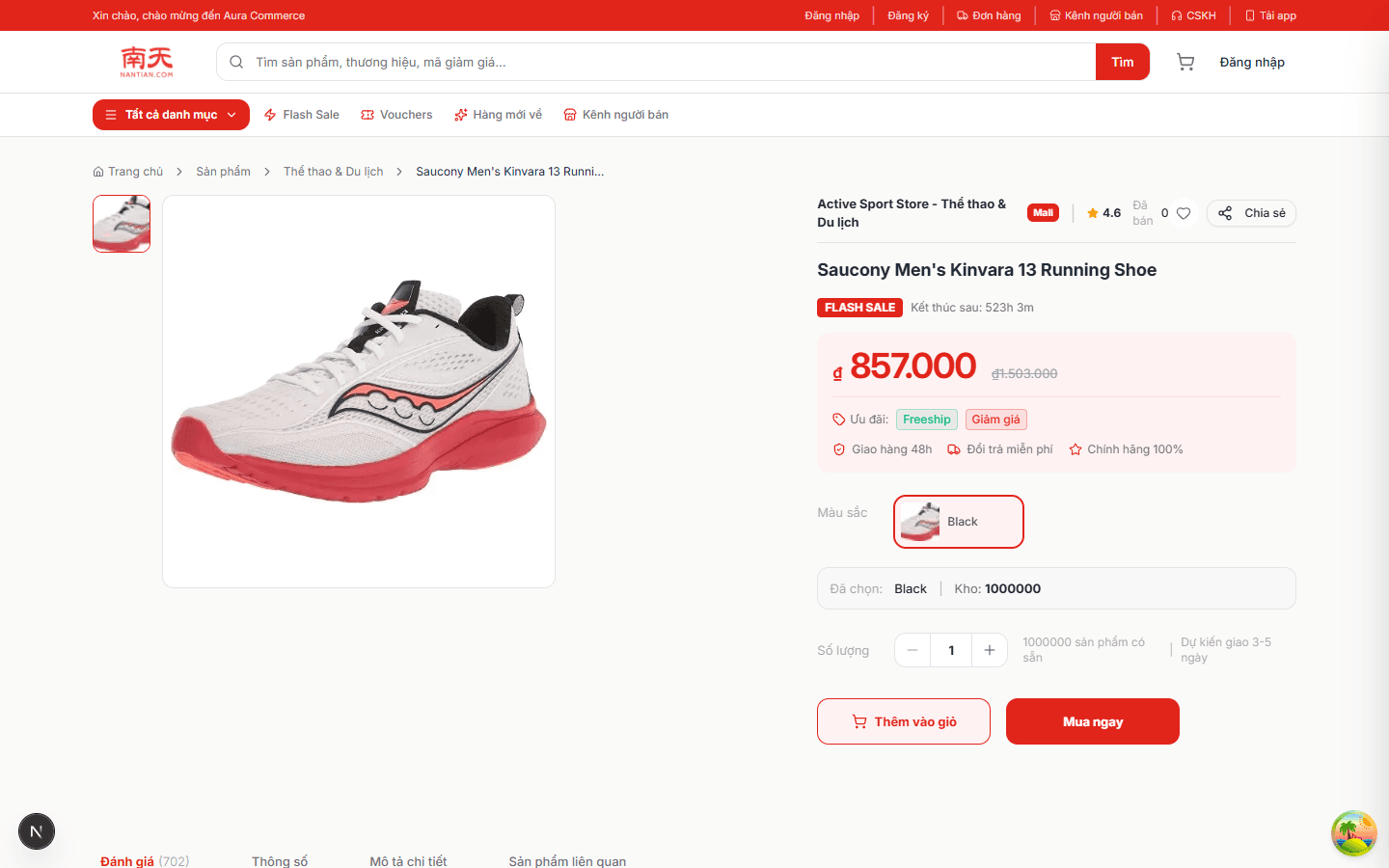
Gallery with thumbnails, variant picker, live stock and sold counts, flash-sale price with the struck-through original, quantity stepper and the two CTAs.

  • Variant selection drives price, stock and image together — one source of truth per combination.
  • Add-to-cart writes to the server-side cart collection, so the basket survives a device change.
  • Inventory is decremented by the inventory service, not by the client.
Flash-sale campaign
Route/flash-sale

Flash-sale campaign

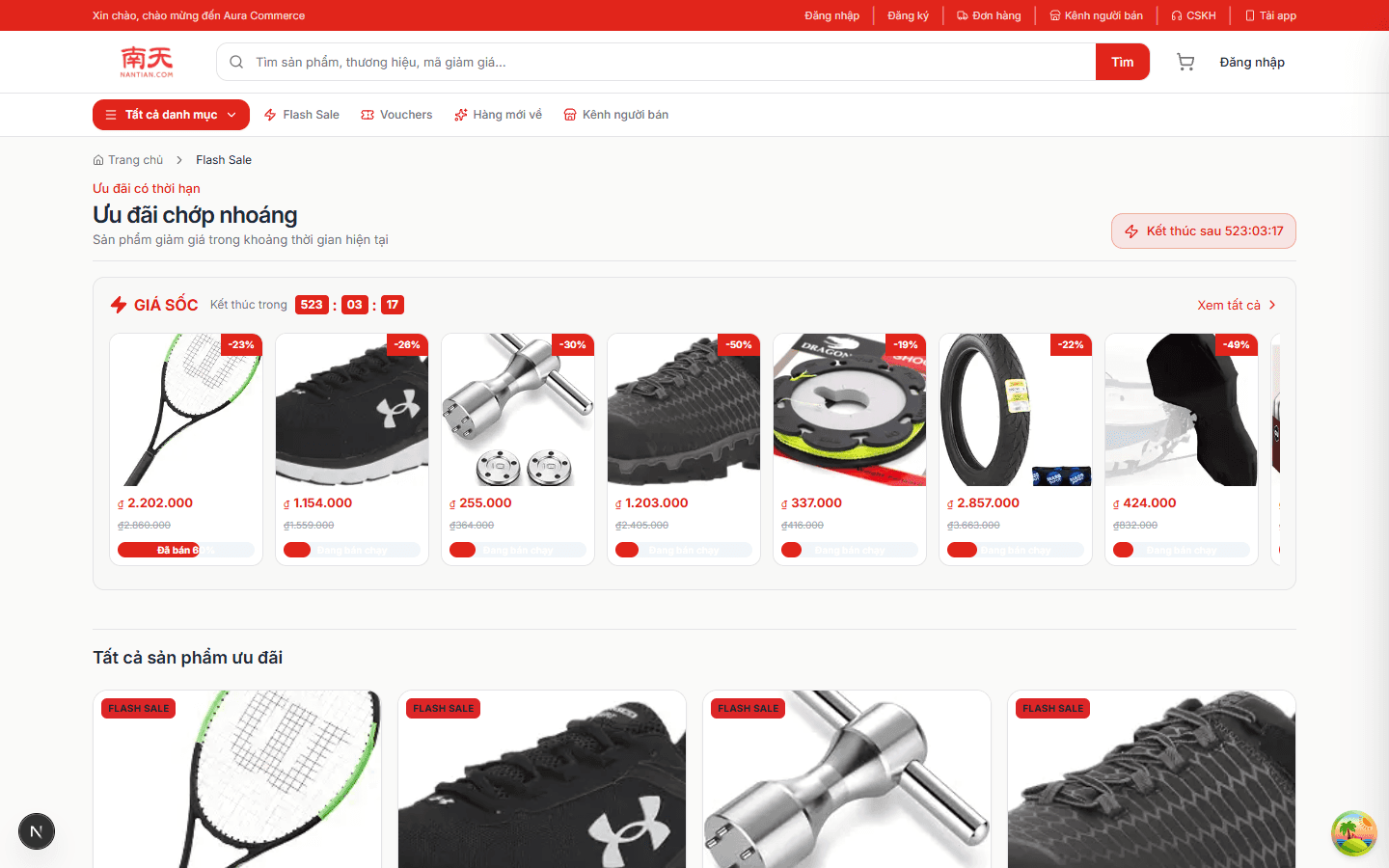
Campaign hub with the session countdown, discount percentage per card, sold-progress bars and a full list of discounted products below.

  • The countdown renders from the campaign end time returned by the API — the client never invents a deadline.
  • Discount price and original price are both stored, so the strike-through is honest.
  • A scheduler service opens and closes sessions server-side.
Cart — grouped by shop
Route/cart

Cart — grouped by shop

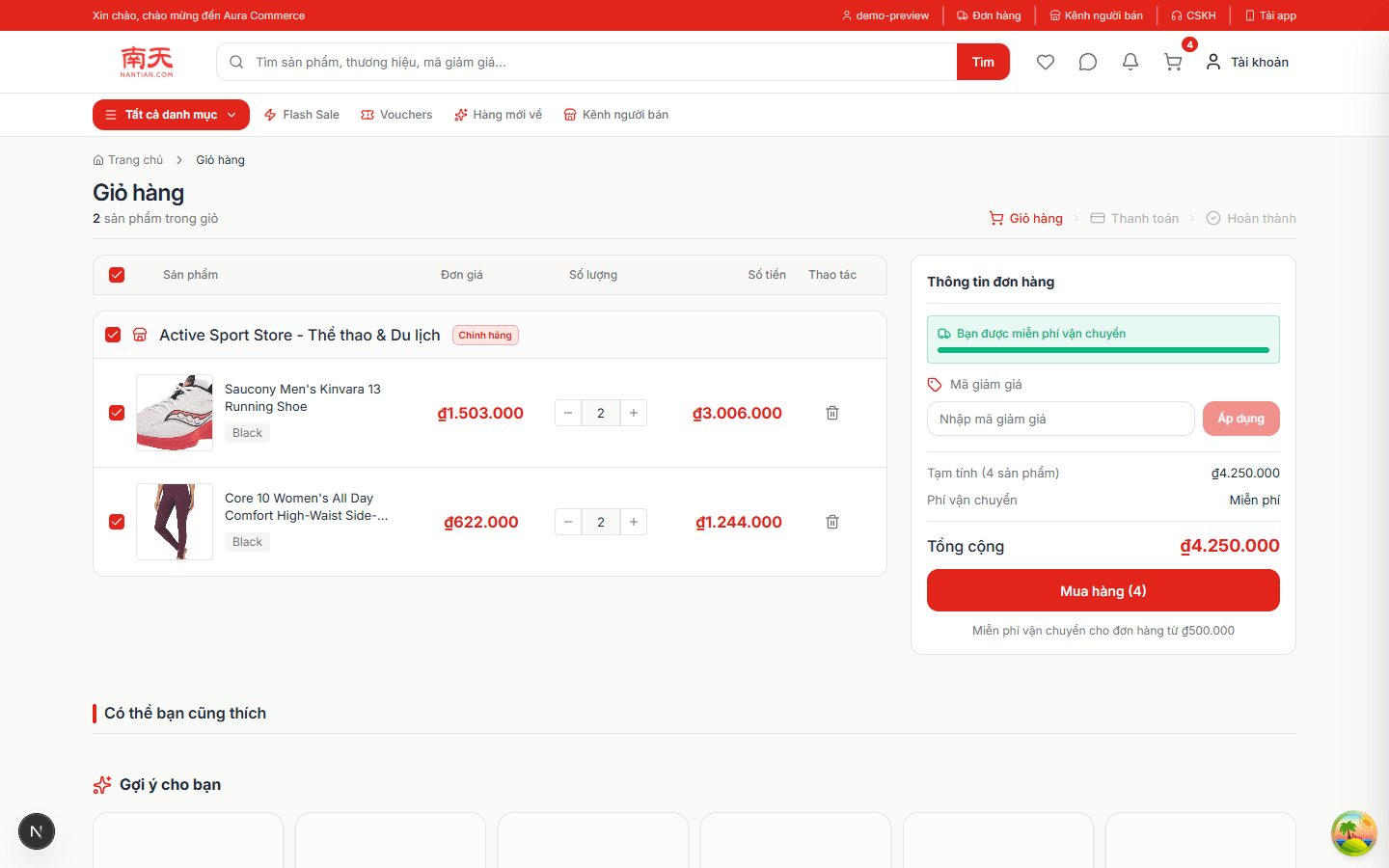
Server-persisted basket grouped per shop, with per-line selection, quantity steppers, a free-shipping bar and a running total.

  • Selection state is explicit: only ticked lines reach checkout, which keeps partial orders honest.
  • Totals are computed server-side from stored prices, never from values sent by the browser.
  • Free-shipping threshold renders as progress — a merchandising rule, not a hard-coded banner.
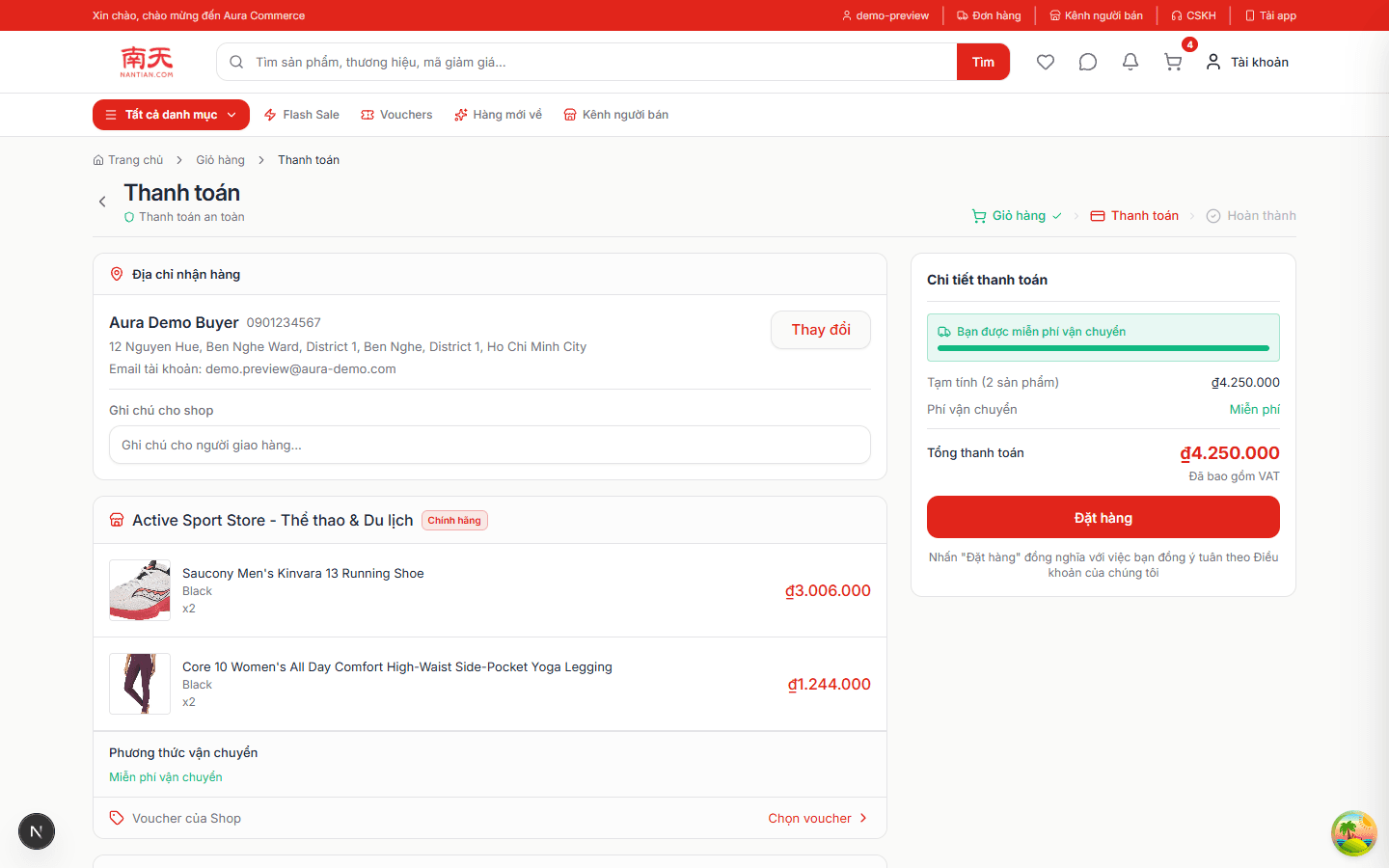
Checkout — address, shipping, payment
Route/checkout

Checkout — address, shipping, payment

Saved address with edit, per-shop order lines, shipping method and fee, voucher slot, COD or VNPay, and the final total with a place-order action.

  • Checkout is blocked until the account has a shipping address — the redirect sends the buyer to the address tab.
  • Shipping fee is calculated by the shipping service, and the order is written with an idempotent submission.
  • VNPay sandbox is wired through the payment service; COD skips the gateway entirely.
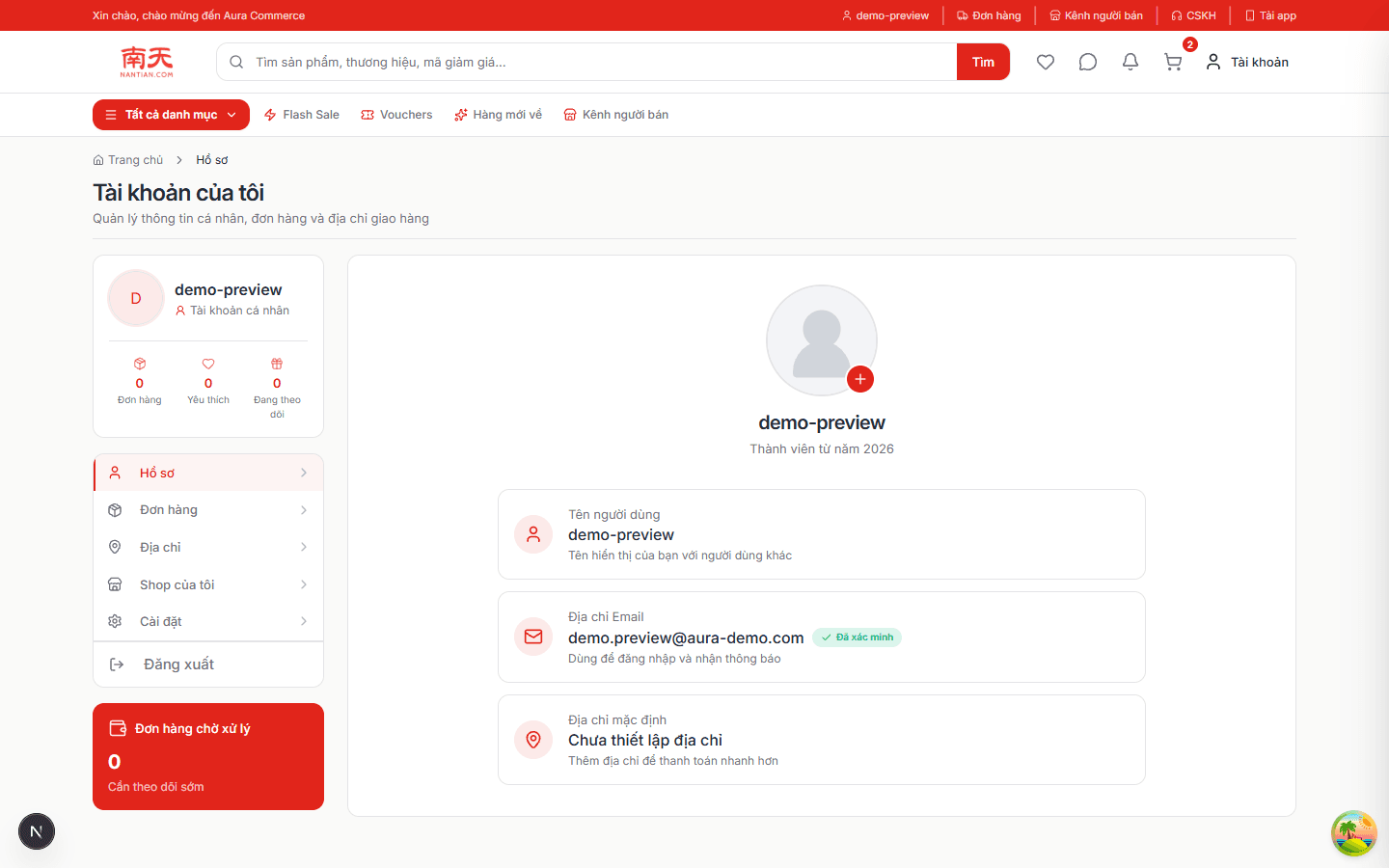
Account area
Route/profile

Account area

Profile, verification badge, counters for orders and favourites, and the tabs leading to address book, shop tools and settings.

  • Session state comes from a httpOnly cookie pair; the client never reads a token.
  • Order / favourite counters are aggregated per user, not derived from the loaded page.
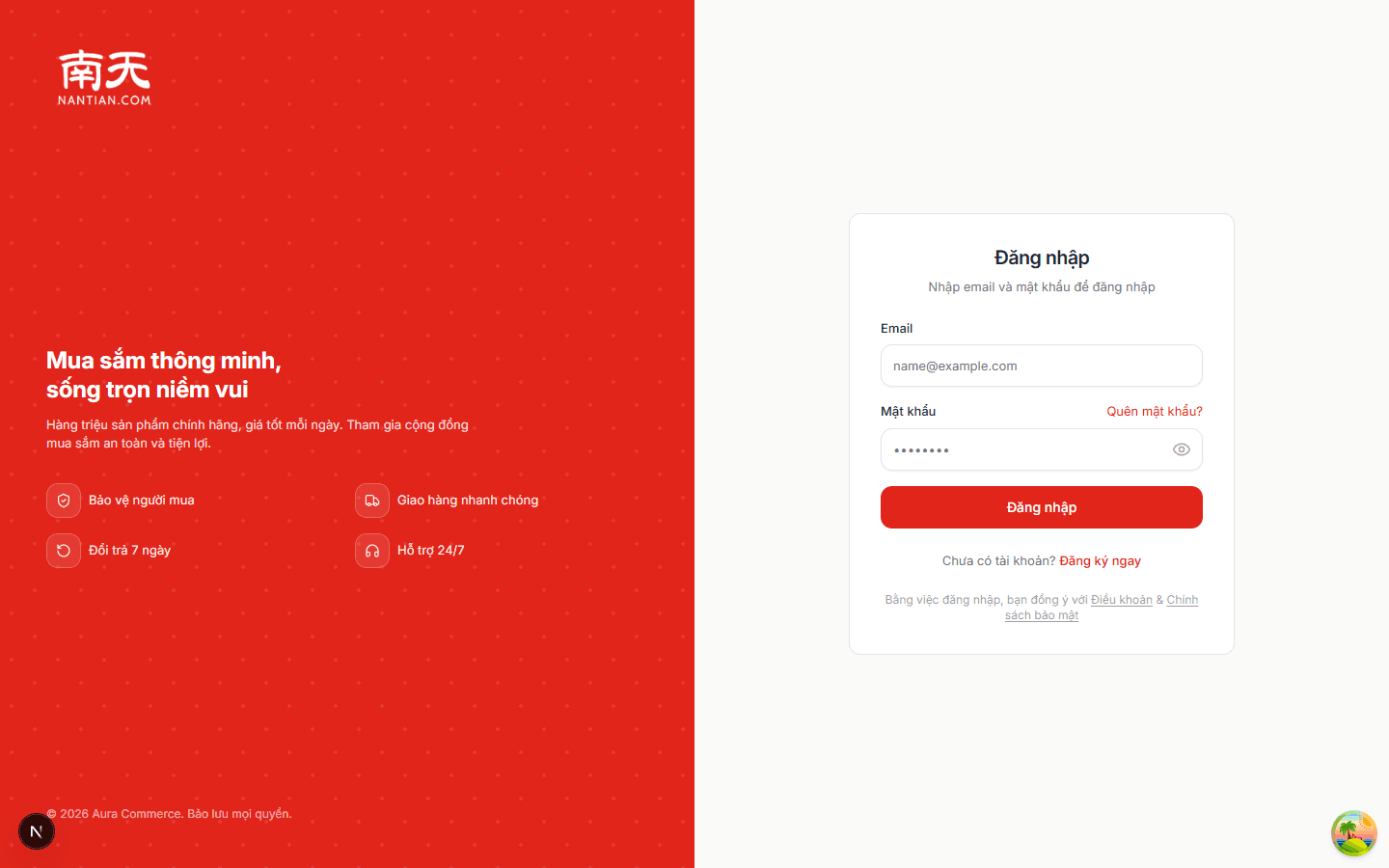
Sign in
Route/login

Sign in

Split-screen sign-in: brand panel on the left, a quiet form on the right with password reveal and recovery link.

  • Access token (30 min) + refresh token (16 days) are issued as httpOnly cookies.
  • Accounts with 2FA enabled get an OTP challenge stored in Redis instead of a session.
  • Login is rate limited and validation rejects malformed emails (no .local pseudo-domains).
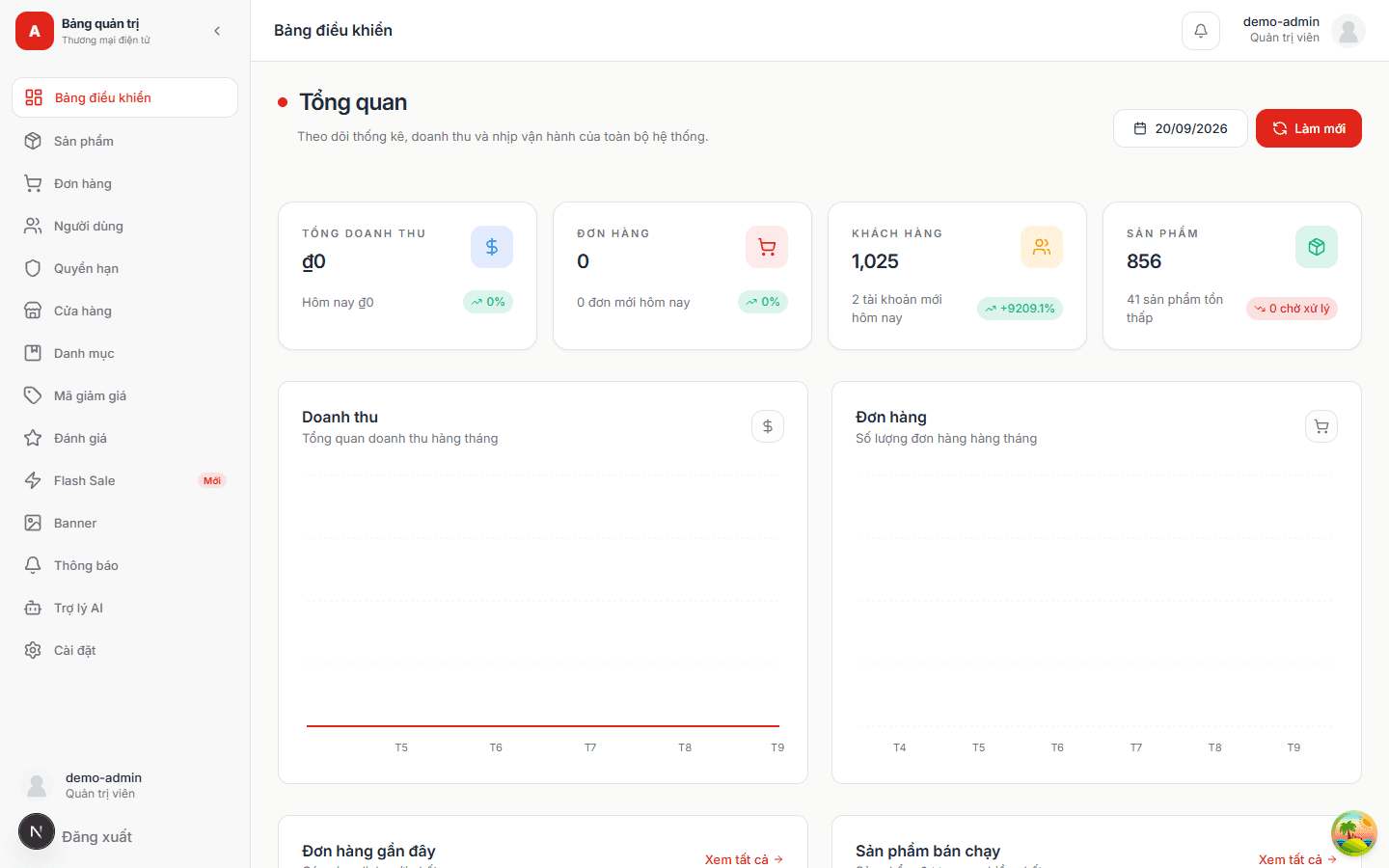
Admin — operations dashboard
Route/admin/dashboard

Admin — operations dashboard

Revenue, orders, customers and catalogue KPIs with revenue/order charts, recent orders and best-selling products below.

  • Each KPI is aggregated by the statistics service rather than by summing a paginated list.
  • The whole /admin tree is role-guarded; the sidebar reflects the permissions the account actually holds.
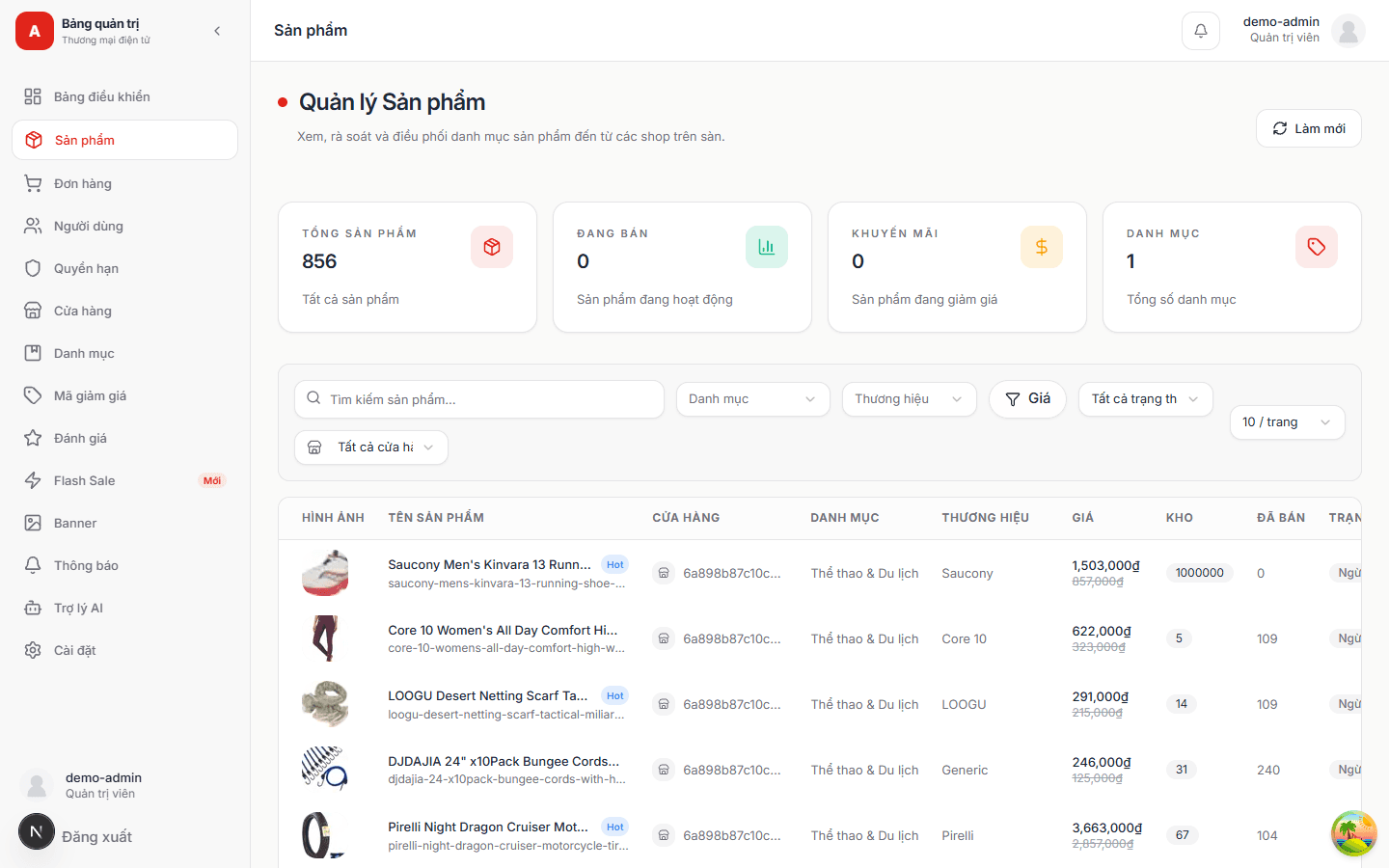
Admin — catalogue management
Route/admin/products

Admin — catalogue management

856 products with search, category, brand, price and status filters; each row exposes stock, sold count and inline actions.

  • Server-side filtering and pagination keep the table responsive at catalogue scale.
  • Bulk dataset import runs through scripts/build-real-dataset.js, which is how the catalogue was seeded.
  • Permission changes are written to an audit trail by the permission service.

Behind the product

Engineering systems

The parts that are not visible in a screenshot: locking, messaging, retries and payment integrity.

  1. 01

    Cluster-mode Express API

    The primary process forks a worker per core so the Node API uses the whole machine; Redis-backed rate limiting and a load-test switch keep the cluster honest.

    Where: server-ecommerce/src/server.js

  2. 02

    Dual-token cookie auth

    Short-lived access token plus a long-lived refresh token, both httpOnly; refresh hashes are rotated per session.

    Where: server-ecommerce/src/services/token.service.js

  3. 03

    Two-factor + email OTP on Redis

    Login challenges, email verification and password reset codes are one-time keys in Redis with a TTL — the API never stores a raw code.

    Where: server-ecommerce/src/services/auth.service.js

  4. 04

    RabbitMQ workers with prefetch + DLQ

    Order and notification consumers run outside the request cycle with per-queue prefetch, retry and dead-letter queues.

    Where: server-ecommerce/src/workers/order.worker.js

  5. 05

    Transactional outbox

    Domain events are written to an outbox collection in the same write as the state change, then published reliably.

    Where: server-ecommerce/src/services/outbox.service.js

  6. 06

    Redis for cache, limits and fan-out

    One Redis serves cached reads, distributed rate limiting, OTP storage and the Socket.IO adapter.

    Where: server-ecommerce/src/services/redis.service.js

  7. 07

    Socket.IO realtime chat

    Buyer↔shop conversations and notifications are pushed over websockets, with the Redis adapter fanning events across workers.

    Where: server-ecommerce/src/socket

  8. 08

    VNPay payments

    Sandbox VNPay flow wired through the payment service, with return handling on the client.

    Where: server-ecommerce/src/services/payment.service.js

  9. 09

    AI assistant & product embeddings

    Mistral via LangChain powers the shopping assistant; embeddings stored per product back semantic search and recommendations.

    Where: server-ecommerce/src/services/embedding.service.js

  10. 10

    Observability & audit trail

    prom-client exposes metrics scraped by Prometheus with Grafana dashboards in Compose; permission changes land in an audit collection.

    Where: server-ecommerce/src/monitoring